
Accounts Receivable3.2 - Download
You'll be able to download in few seconds.
Publisher Description
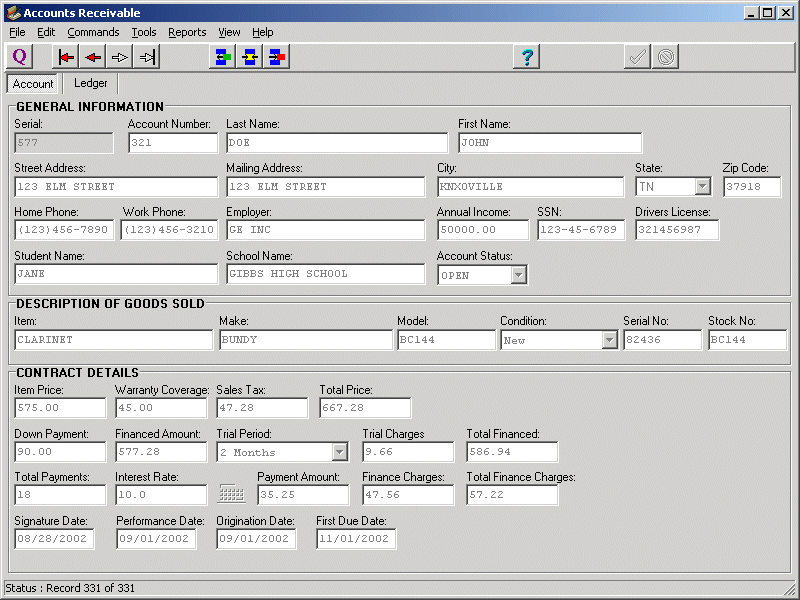
The Markosoft Accounts Receivable application has everything you need for maintaining all of your accounts for retail sales of merchandise purchased on time. Log and track all transactions, assess late fees, create past due notices, and print out a variety of reports including client address labels and status reports with this all encompassing and versatile package.
Special features such as the ability to amortize payments and automatically assess sales taxes are included in the base package. A full accounting ledger is available for logging transactions and applicable late fees can be automatically calculated and assessed by means of some of the Accounts Receivables built in features.
Late notices can be printed using the included default notices or custom notices can be produced by the user with templates created via Microsoft Word. By using special keywords explained in the help files, these custom notices can be altered to meet all of the specific needs of your business.
If your business does repair or service work, the Work Orders portion of the program can be used to track the progress of work in process. The Work Orders component includes the ability to generate work orders and invoices as well as providing a means of tracking parts inventories via a perpetual inventory system. This module may also be used as a stand alone application that is completely separate from the main Accounts Receivable module so that the program can be placed on individual technician's computers.
About Accounts Receivable
This Accounting & Finance program is available in English. It was last updated on 29 September, 2026. Accounts Receivable is compatible with the following operating systems: Windows.
The company that develops Accounts Receivable is Markosoft Inc. The latest version released by its developer is 3.2.
The download we have available for Accounts Receivable has a file size of 1.0 MB. Just click the green Download button above to start the downloading process. The program is listed on our website since 2003-10-01 and was downloaded 0 times. We have already checked if the download link is safe, however for your own protection we recommend that you scan the downloaded software with your antivirus. Your antivirus may detect the Accounts Receivable as malware if the download link is broken.
How to install Accounts Receivable on your Windows device:
- Click on the Download button on our website. This will start the download from the website of the developer.
- Once the Accounts Receivable is downloaded click on it to start the setup process (assuming you are on a desktop computer).
- When the installation is finished you should be able to see and run the program.
Program Details
System requirements
Download information
Pricing
Version History
version 3.1.5
posted on 2003-10-01
Updated to support international date formats
Disclaimer
External Download
We do not host Accounts Receivable on our servers. We did not scan it for viruses, adware, spyware or other type of malware. This app is hosted by the software publisher and passed their terms and conditions to be listed there. We recommend caution when installing it.
The external download link for Accounts Receivable is provided to you by apps112.com without any warranties, representations or guarantees of any kind, so access it at your own risk.
If you have questions regarding this particular app contact the publisher directly. For questions about the functionalities of apps112.com contact us.
